.svg)
.jpg)
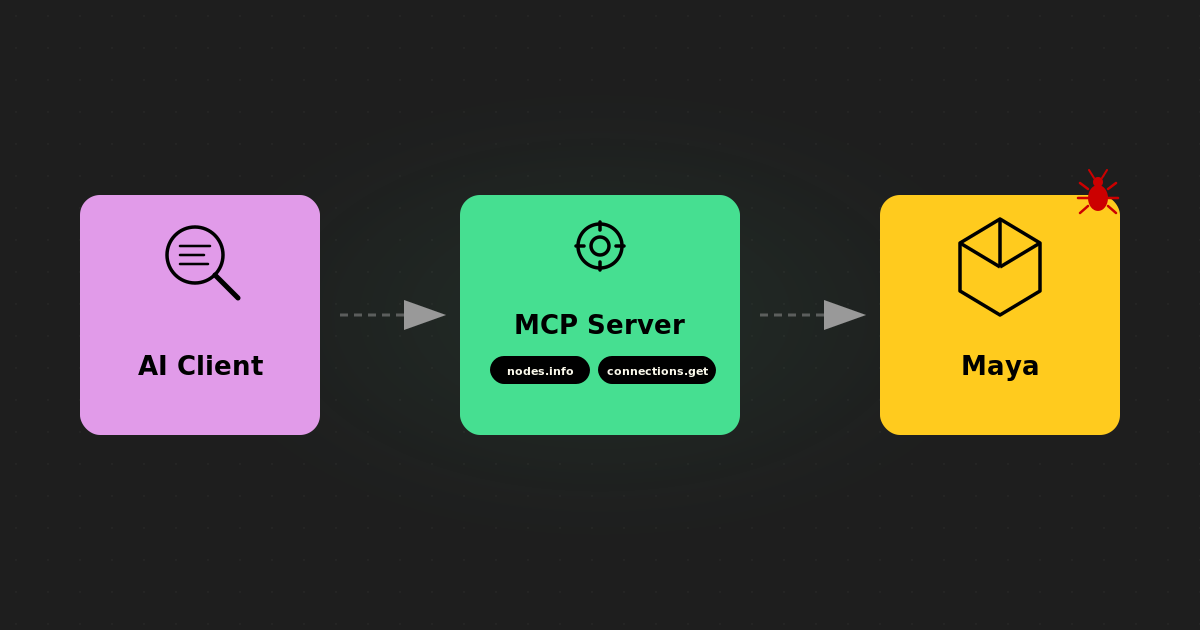
This isn't a contrived demo. It's a bug that was killing Maya on our production rig, and we're going to walk through how the MCP server turned an AI assistant into something that could actually help debug it.
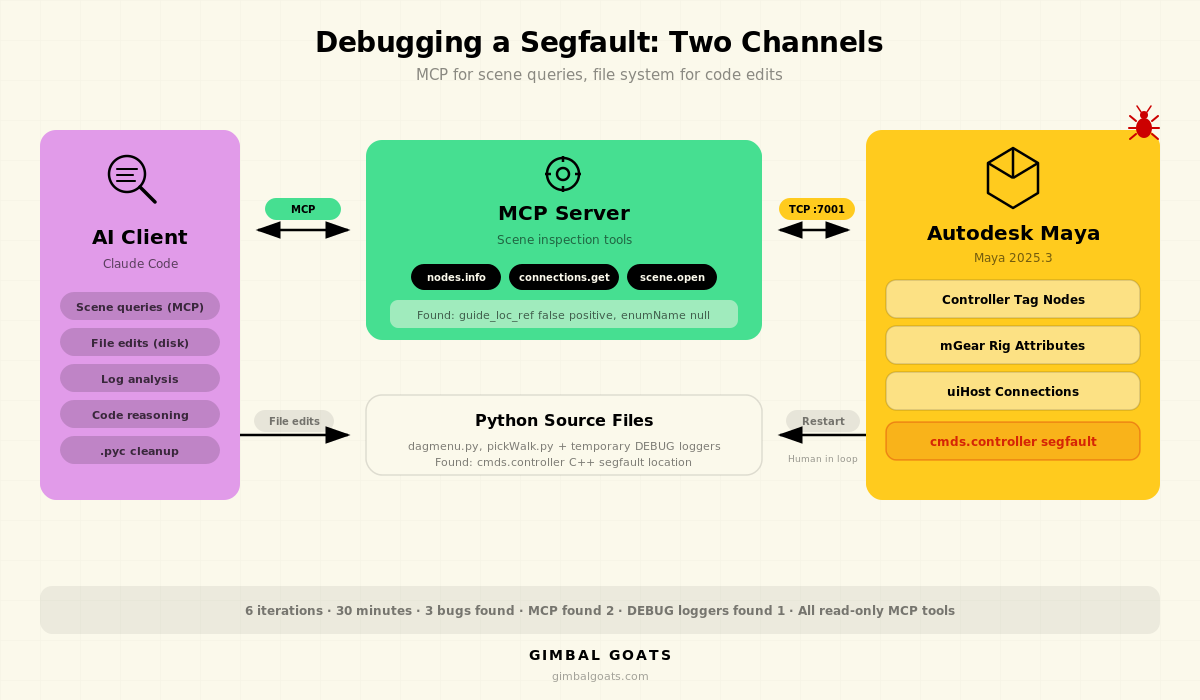
The Problem
Right-clicking on certain controls in our character rig (body, spine) hard-crashed Maya. No Python traceback, no error dialog, nothing. Maya's process just died, closing to desktop and taking any unsaved work with it.
This was on Maya 2025.3, using an mGear-based rig. A previous commit had tried to fix the issue by guarding against None values in the dagmenu code, but the crash persisted. The tricky part: this was a C++ segfault inside Maya's own code. Python's try/except can't catch it. There's nothing to catch. The process is just gone.
If you've ever tried to debug a segfault in Maya, it's not so easy. You can't set a breakpoint. You can't wrap it in a try block. You're left adding print statements, restarting Maya, and trying to piece together what happened from whatever output survived before the crash.
We had one extra tool available: Maya MCP.
What the MCP Server Actually Did
Let's be specific about what the MCP connection gave us.
Scene Inspection Without the Back-and-Forth
The first thing we needed was to understand the state of the nodes involved in the crash. Which attributes did the body control have? What were their types and values? What was connected to what?
Without MCP, that process looks like this: the human opens the Attribute Editor, reads off values, pastes them into the chat, the AI asks a follow-up question, the human goes back to Maya, checks another node, pastes more output. It works, but it's slow and error-prone. You're manually serializing scene state into text.
With MCP, the AI called nodes.info on body_C_001_CTRL and got back a complete JSON dump of every attribute on the node: names, types, values, connections. One tool call, structured data, no ambiguity.
Tool call: nodes.info("body_C_001_CTRL", info_category="all")

Response (excerpt):
{
  "keyable_attributes": {
    "translateX": 0,
    "rotateX": 0,
    "isCtl": false,
    "uiHost": "spineUI_C_001_CTRL",
    "guide_loc_ref": "root",
    "shifter_name": "body_C1_ctl"
  }
}
That guide_loc_ref attribute, a string with the value "root", turned out to be the key to understanding one of the bugs. But we didn't know that yet. The AI spotted it because it could see the actual data.
Comparing Nodes to Find the Pattern
The next step was comparing controls that crashed with controls that didn't. Arms worked fine. Body and spine didn't. Why?
The AI used nodes.info on multiple controls (body_C_001_CTRL, armUI_L_001_CTRL, spineUI_C_001_CTRL) and compared their attribute sets side by side. It found that arm controls had real space-switch attributes (enum type, integer values like arm_ikref, arm_upvref) alongside guide_loc_ref, while body and spine controls only had guide_loc_ref.
This mattered because the dagmenu code was matching attributes by name suffix. Anything ending in "ref" was treated as a space-switch attribute. guide_loc_ref ends in "ref", so it matched, but it's a string, not an enum. On arm controls, the false positive got mixed in with real matches and was harmless. On body controls, it was the only match, and it broke the downstream logic.
The AI found this by looking at the data, not by reading the code and guessing. It queried the scene, saw the attribute types, and correlated that with what the code was doing. That's the kind of reasoning that's much harder when the AI is working from pasted Script Editor output instead of structured JSON.
Tracing Connections
We also used connections.get to verify how controls were wired to their UI host nodes. The dagmenu code uses a uiHost_cnx connection to find the right UI control for building the right-click menu. By querying these connections through MCP, the AI could confirm the connection graph matched what the code expected, and identify where it diverged.
What MCP Didn't Do
This is just as important as what it did, and it's worth being honest about.
The AI didn't reproduce the crash. The human had to select the control in the viewport, right-click, and watch Maya die. MCP doesn't have a tool for "simulate a right-click in the viewport," (yet?). That's interactive UI, not scene data.
The AI didn't restart Maya. Each debug iteration required relaunching Maya to load fresh code. That was manual. (Fixing this!)
The debug loggers weren't done through MCP. The AI did add temporary DEBUG loggers and analyze the Script Editor output after each crash, but it did that by editing the Python source files on disk and reading the logs, not by executing code through the MCP server. MCP handled the scene queries. Claude Code handled the file edits. Those are two different channels, and this session used both.
The segfault itself wasn't found through MCP either. MCP gave us the scene context to find two of the three bugs (the false positive attribute matching and the enumName null check). The actual segfault, in cmds.controller's C++ internals, was found through the debug logger loop: the AI edited the source, the human relaunched Maya and reproduced the crash, then the AI read the last output before Maya died and narrowed down the location.
The point isn't that MCP solved everything. It's that it solved the parts that are hardest to do without it: getting accurate, structured scene data into the AI's context so it can reason about what's actually happening in your file. The rest of the debugging, the file edits and log analysis, the AI handled through its normal tools.
The Debug Loop
Here's how the session actually played out, compressed. Six iterations over roughly 30 minutes.
Iterations 1-2 were mostly MCP-driven. The AI connected to Maya, opened the rig, and started querying nodes. It found the guide_loc_ref false positive by comparing attribute sets across controls. It traced the uiHost_cnx connections. It read the dagmenu source code. By the end of iteration 2, we had a clear picture of the attribute-matching bug and a fix for it.
Iteration 3 applied the attribute fix and restarted Maya. Still crashed. The attribute bug was real, but it wasn't the crash. Something else was killing Maya before that code was even reached.
Iterations 4-5 shifted to the debug logger approach. The AI edited the Python source to add temporary DEBUG loggers at key points in the dagmenu fill function and inside get_all_tag_children in pickWalk.py. After each restart and crash, the AI read the Script Editor output and analyzed where Maya had gotten to before dying. The trace showed the crash happening deep in a controller tag traversal. cmds.controller was segfaulting after iterating through 71 tags across 6 levels of hierarchy.
Iteration 6: the AI replaced cmds.controller entirely with direct cmds.listConnections calls on the tag nodes' .children and .controllerObject attributes. Same traversal, but without touching the buggy C++ code path. No more crash.
Three bugs total: a C++ segfault in cmds.controller, a false positive in attribute suffix matching, and a null check on enumName for non-enum attributes. The MCP connection was directly responsible for finding bugs two and three. Bug one required the traditional approach, but having the other two already identified and fixed meant we could isolate it cleanly.
Why This Matters for the MCP Approach
We've been asked whether Maya MCP is really useful beyond simple queries like "list my joints" or "check my skin weights." This session is our answer.
The value of an MCP server isn't just convenience. It's that the AI can form its own hypotheses and test them against real scene data. When Claude saw guide_loc_ref in the attribute list, it didn't need us to explain what that attribute was or why it was suspicious. It could see the type was string, see the suffix was ref, cross-reference with the code that matches on suffix, and identify the false positive. That reasoning chain happened because the data was structured and complete, not because someone carefully curated what to paste into the chat.
This is the difference between an AI that can read code and suggest fixes, and an AI that can look at your scene and tell you what's actually wrong. The code is half the picture. The scene state is the other half. MCP gives the AI both.
Building a Reproduction Case Through MCP
After submitting the fix upstream, we needed a minimal reproduction file he could test with.
This is where MCP proved valuable again. We connected Claude to a fresh Maya session with the production rig loaded and used it to systematically reverse-engineer what triggers the crash.
First, we used nodes.info and connections.list on the production rig's controller tags to map out the full hierarchy: 827 tags, 149 orphan root tags (face controls, ghost controls), wide fan-out nodes (35 children on the spine tag), prepopulate chains, and the rigCtlTags array on the rig root.
Then we tried programmatic recreation. Claude used MCP to create 827 controller tags in a fresh scene with createNode("controller"), connected them with the same parent/children/prepopulate topology as the production rig, and ran the traversal. No crash. Tried with cmds.controller() instead. No crash. Tried with 3,410 tags in a clean tree structure. No crash.
The breakthrough came when we saved the programmatic scene to a .ma file, reopened it, and ran the traversal. Crash. Every time. Tags created in-memory and traversed immediately survived. The same tags loaded from a .ma file crashed. The .ma file round-trip changes something in Maya's internal C++ state on the controller tag nodes. When cmds.controller(q=True, children=True) then traverses them, it hits a null pointer.
Maya's crash log confirmed it:
Exception code: C0000005: ACCESS_VIOLATION - illegal read at address 0x0000000D
Fault address: in Foundation.dll

Call stack:
  Foundation.dll    TnameObject::isReserved()
  Foundation.dll    TnameObject::name()
  AnimSlice.dll     TtimeWarpCmd::undoIt()
  CommandEngine.dll TmetaCommand::doCommand()
A null pointer dereference inside TnameObject::isReserved(). The controller traversal reads a name from an object that doesn't exist after the file reload.
We built an anonymized version of the scene through MCP: same hierarchy topology, generic names (ctrl_0001, tag_0001), 305 KB. Load the file, traverse all tags, Maya crashes. A clean, self-contained reproduction case that anyone can run without needing a production rig.
The entire investigation (inspecting production tags, comparing with programmatic tags, testing hypotheses, building the anonymized file, confirming the crash) happened through MCP tool calls. Claude could query the scene, create nodes, save files, and reload them, all without manual Script Editor work. This was the session where MCP's write tools pulled their weight alongside the read tools.
The Fixes, Briefly
Since the focus of this post is the debugging process and how MCP contributed, here's a short summary of what we actually changed. If you're hitting similar issues with mGear's dagmenu on Maya 2025, the details might save you some time.
The segfault fix: Replaced cmds.controller(tags, query=True, children=True) with direct cmds.listConnections traversal on controller tag nodes' .children and .controllerObject attributes. Added cycle protection with a seen_tags set. This avoids the buggy C++ code path entirely while producing the same results.
The false positive fix: Added an attribute type check in _get_switch_node_attrs to skip string and typed attributes. Space-switch attributes are enums or numeric. guide_loc_ref is neither.
The null guard: Added a check for None return from cmds.addAttr(query=True, enumName=True) before calling .split(":") on it.
All three fixes were submitted upstream to the repo. The segfault may be specific to Maya 2025.3, and Autodesk may have patched the underlying C++ bug in a later update.
We build this kind of tooling for studios every day. See our character rigging services and Maya tool development.