.svg)
.jpg)
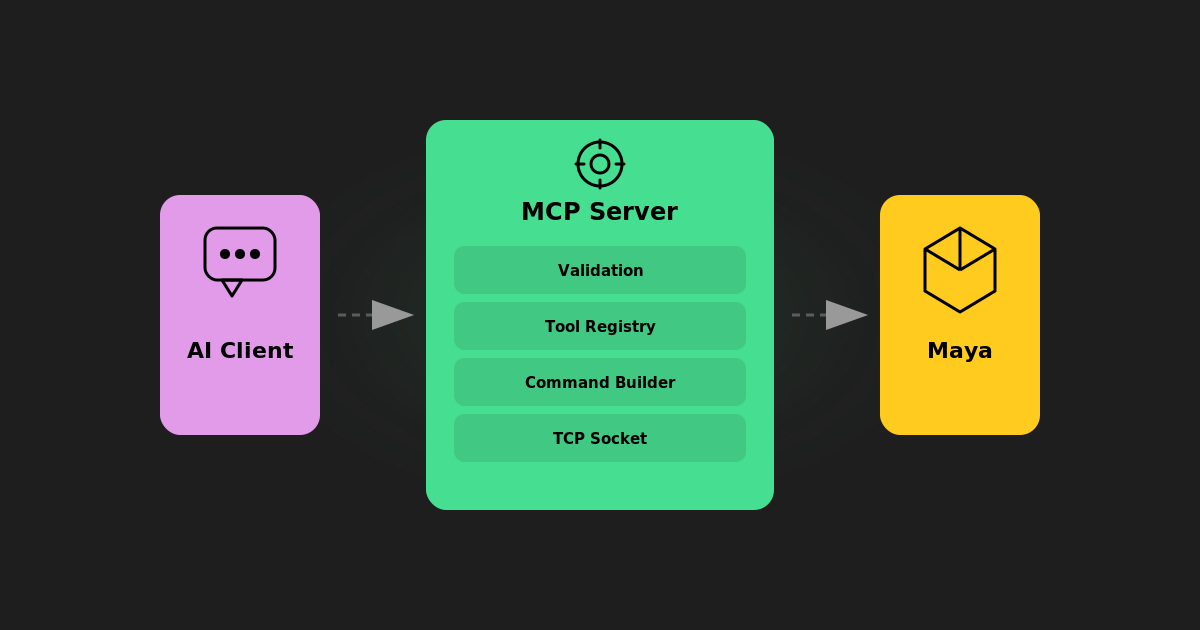
Inside Maya MCP: Architecture & Real Examples
In Part 1 we covered what Maya MCP is and isn't. Now let's look at how it actually works: the transport layer, how tools are structured, the safety decisions we made, and some concrete examples you can try yourself.
This post is for TDs and developers who want to understand the internals before integrating it into a pipeline, and for riggers who are curious about what's happening when the AI talks to their scene.
Maya MCP is open source. You can view the source on GitHub, follow the complete documentation, install it from PyPI, or download the latest Claude Desktop extension.
https://github.com/GimbalGoats/GG_MayaMCPhttps://gimbalgoats.github.io/GG_MayaMCP/https://pypi.org/project/maya-mcp/https://github.com/GimbalGoats/GG_MayaMCP/releases/latest
The Transport Layer
Maya MCP does not import maya.cmds. This is intentional. The server is a completely separate Python process that talks to Maya over a TCP socket, specifically Maya's built-in commandPort
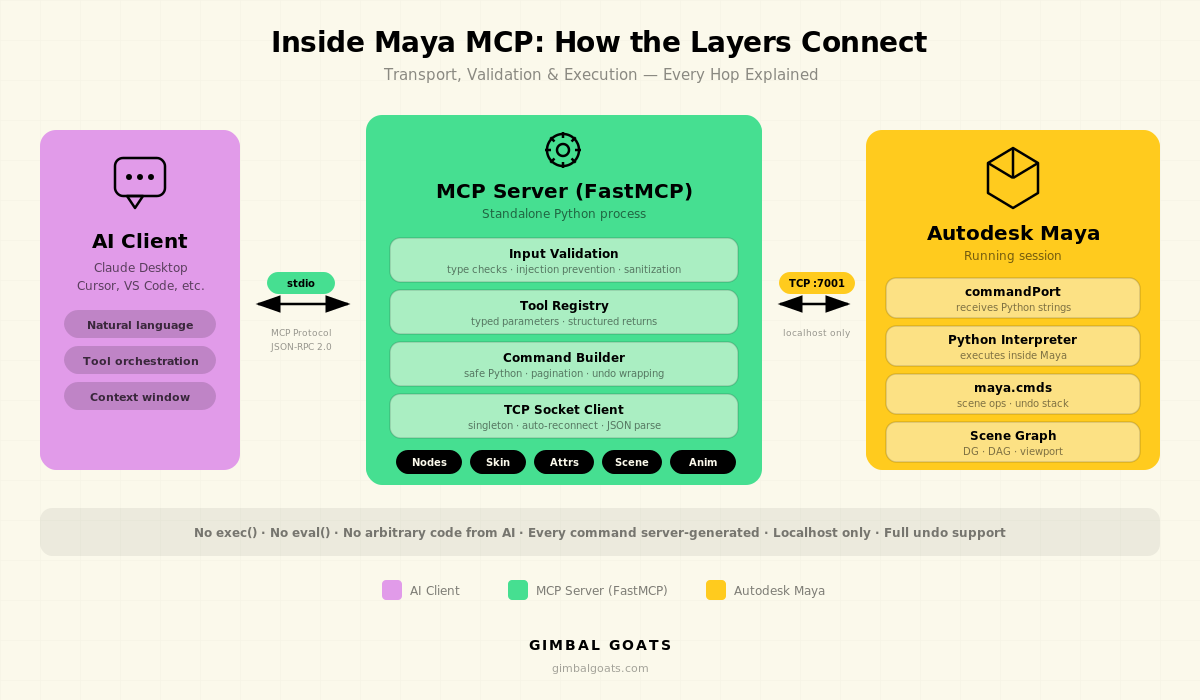
The flow looks like this:
AI Client
    │
    ├──(stdio / MCP protocol)──► Maya MCP Server
    │                              │
    │                              ├──(TCP socket, localhost:7001)
    │                              │
    │                              ├──► Maya commandPort
    │                              │
    │                              └──► maya.cmds / Python
The AI client (Claude, Cursor, etc.) communicates with the MCP server using the standard MCP protocol over stdio. The server translates tool calls into Python commands, sends them to Maya via a TCP socket, parses the JSON response, and returns structured data back to the AI.
Why commandPort instead of a plugin? Because it means zero footprint inside Maya. Nothing to compile, nothing to load, no DLL versioning issues. Maya's commandPort has been around for years, it's stable, and it works across Maya versions. The trade-off is that every command is a string sent over a socket, but we get crash isolation, transport independence, and a clean separation of concerns in return.
Opening the Port
Use the version-aware setup helper included with Maya MCP. Do not replace it with a generic one-line commandPort snippet: Maya 2024 requires a compatibility response handler to return structured results correctly.
- Open
scripts/enable_commandport.pyin the GitHub repository. - Copy the complete file.
- In Maya, open Windows → General Editors → Script Editor.
- Select the Python tab.
- Paste the complete script.
- Press
Ctrl+Enter, or click Execute.
The helper opens the server on localhost port 7001 by default. On Maya 2025 and later, it uses the standard Python and echo-output configuration. On Maya 2024, it automatically selects the compatibility response handler, disables echo output, and adjusts the response buffer. You do not need to choose the mode manually.
To open the port automatically whenever Maya starts, use the repository’s version-aware userSetup.py example.
How Tools Are Built
Every capability in Maya MCP is a tool: a function with typed parameters, validation, and a structured return value. Tools are organized into logical groups: nodes, attributes, connections, skinning, modeling, shading, animation, and scene management.
Here's the pattern every tool follows:
1. Validate inputs on the server side (Python, outside Maya)
2. Build a Maya command, a self-contained Python snippet
3. Send it to Maya via the commandPort socket
4. Parse the JSON response Maya sends back
5. Return structured data to the AI client
The key insight is that the Python snippet sent to Maya is generated by the tool, not by the AI. The AI only controls the parameters ("which node," "which attribute," "what value"). The tool controls the logic.
Example: Listing Nodes
When the AI asks "show me all skinCluster nodes," it calls the nodes_list tool with node_type="skinCluster". Here's a simplified view of what happens:
# What the AI calls (via MCP protocol):
nodes_list(node_type="skinCluster")

# What the server validates:
# - node_type is a safe string (no injection)
# - pattern is valid

# What gets sent to Maya over the socket:
"""
import json

import maya.cmds as cmds

nodes = cmds.ls("*", type="skinCluster", long=False) or []
print(json.dumps(nodes))
"""

# What comes back (parsed from Maya's response):
{
    "nodes": [
        "skinCluster1",
        "skinCluster2",
        "body_skinCluster",
    ],
    "count": 3,
}
The AI never sees or writes the Maya command. It just gets back a clean JSON object with the data it asked for.
Example: Querying Skin Weights
Skin weights are where things get interesting, and where the pagination design matters. Production meshes can have tens of thousands of vertices, each with multiple influence weights. Dumping all of that into a single response would blow up any AI's context window.
# AI calls:
skin_weights_get(
    skin_cluster="body_skinCluster",
    offset=0,
    limit=50,
)

# Returns:
{
    "skin_cluster": "body_skinCluster",
    "mesh": "body_geo",
    "vertex_count": 12847,
    "influences": [
        "spine_01_jnt",
        "spine_02_jnt",
        "hips_jnt",
        ...,
    ],
    "vertices": [
        {
            "vertex_id": 0,
            "weights": {
                "hips_jnt": 0.95,
                "spine_01_jnt": 0.05,
            },
        },
        {
            "vertex_id": 1,
            "weights": {
                "hips_jnt": 0.88,
                "spine_01_jnt": 0.12,
            },
        },
        ...,
    ],
    "count": 50,
    "truncated": True,
}
The AI can page through the data, or ask for specific ranges. It can also analyze the weights it receives and decide what to look at next: "these vertices near the shoulder have unusual influence counts, let me check the area around vertex 3200."
The Safety Model
We get asked about safety a lot, especially from pipeline TDs who've seen what happens when an AI runs arbitrary code in a production scene. Here are the specific decisions we made.
No arbitrary AI code execution by default. The normal MCP tool surface does not forward AI-authored Python directly into Maya. Known tool functions validate their parameters and generate the Maya-side commands. Optional raw script tools exist, but remain disabled unless the operator explicitly enables them.
Input validation before execution. Node names, patterns, and attribute names are validated on the server side before anything is sent to Maya. Characters that could enable injection (semicolons, backticks, etc.) are rejected. This happens in Python, before the TCP socket is involved.
# Simplified version of the validation:
def validate_node_name(name: str) -> None:
    """Reject names that could enable command injection."""
    invalid_chars = ';`$\\"\''
    if any(char in name for char in invalid_chars):
        raise ValueError(
            f"Invalid characters in node name: {name!r}"
        )
Undo support. Every mutating operation is undoable through Maya's standard undo system. The AI can try something, evaluate the result, and undo it. This is critical for iterative workflows. The AI doesn't need to get it right on the first try.
Response size guards. Large queries (listing thousands of nodes, getting weights for an entire mesh) are automatically paginated and truncated to prevent memory issues on both sides. The AI gets a `truncated: true` flag and can request more data if needed.
Localhost only. The CommandPortClient only accepts connections to localhost or 127.0.0.1. This is enforced in the connection config. You can't accidentally expose your Maya session to the network.
Design Decisions Worth Knowing
A few choices that aren't obvious from the outside but matter for anyone evaluating this for production use.
FastMCP as the framework. We built on FastMCP (from Anthropic) rather than implementing the MCP protocol from scratch. This means we get protocol compliance, tool registration, and transport handling for free, and we can focus on the Maya-specific logic.
Singleton client with auto-reconnect. The server maintains a single socket connection to Maya. If the connection drops (Maya restart, port timeout), it automatically reconnects on the next tool call. The AI experiences a brief delay, not an error.
JSON everywhere. Every tool returns JSON. Every command sent to Maya prints JSON. This makes parsing predictable and debugging straightforward. You can read the raw socket traffic and understand what's happening.
Typed tool signatures. Tool parameters use Python type hints and Literal types for constrained values. When the AI calls skin_bind(bind_method="heatMap"), the server validates that "heatMap" is one of the allowed values before doing anything. This catches mistakes early and gives clear error messages.
What This Looks Like in Practice
Here's a quick example of how the pieces fit together. With the commandPort open in Maya and the MCP server running, you can ask your AI something like:
> "List all the joints in my scene and tell me if any have non-zero
> rotations on their bind pose."
The AI will use the nodes_list and nodes_info tools to query your scene, analyze the results, and give you a structured answer, no script writing required. It pages through joints, checks transform values, and cross-references what it finds.
The Maya-side setup uses the version-aware enable_commandport.py helper to open the local socket correctly for the installed Maya version. The MCP server handles tool registration, input validation, socket communication, response parsing, pagination, and reconnection.
We build this kind of tooling for studios every day. See our character rigging services and Maya tool development.